A student at the University of California, Davis, named Louise Shivers, was accused of AI plagiarism, but she proved her innocence by showing timestamps in Google Docs' revision history. A student from Central Methodist University, Moira Olmsted, was accused by Turnitin but found innocent; the experience taught her to screen-record every writing session and create a digital paper trail before submitting anything. These are not the stories of students who have learned to cheat more effectively. These are the stories of honest writers who have learned the world is not on their side anymore.
That shift is real and accelerating. By 2026, universities will increasingly require version history logs alongside submitted work, review timestamps when suspicions arise, and establish formal appeal processes specifically for AI-detection disputes. University AI policies 2026 documents that institutions such as Harvard, Oxford, and Michigan have begun to revise their policies from a general prohibition of AI to a system of disclosure-based policies, and some of them now consider revision logs, oral defenses, and previous writing samples as forms of evidence of authorship in plagiarism disputes. No longer is the issue of how to prove that you wrote something yourself a matter of theory. It is a practical skill that writers, researchers, and content professionals need to master in 2026.
The tools, practices, and strategies included in this guide are the most effective for providing the strongest possible evidence of true authorship, from version history timestamps to Grammarly Authorship reports to research note documentation. An AI text humanizer helps adjust the statistical properties of genuine writing to avoid triggering detection algorithms, but documentation of the writing process is what protects you if you are flagged anyway. Both layers of protection matter.
Key Takeaways
The numbers provided by the AI detection software are not absolute proof of artificial intelligence involvement but rather probabilistic outputs. This is something all major detection software makes explicit. The presence of a flag simply means that an investigation is necessary; it is not a sign that you have cheated. The burden of proof for cheating remains on the accuser; your documentation makes this much harder to prove.
Your version history in Google Docs is your strongest evidence of process. It is a chronological record of all edits to the document, automatically recorded by Google. It cannot be falsified or altered retrospectively. A document that demonstrates gradual development over several days and sessions is quite different from one that simply materializes as complete text mere moments before the deadline.
Grammarly Authorship, which is now available to the general public as of April 2025, monitors your writing sessions and identifies whether the text is written by you, generated by an artificial intelligence program, or copied from other sources. The report is shareable, specifically designed to serve as an authorship verification tool, and can be shared with an instructor or reviewer who is not a Grammarly user.
Your research notes, source annotations, and drafts written in your own voice are strong forms of secondary authentication that artificial intelligence products rarely possess. An artificial intelligence assistant or program will not leave handwritten margin notes, outlines, or draft paragraphs and then delete them. Your research process serves as a form of authentication for your ideas, even if your final draft is well-written and polished.
The metadata in Word documents and PDFs stores the author's name, creation date, and modification history. This information is verifiable and cannot be easily forged, unlike the file's content. Knowing a file's metadata and ensuring it matches the author's identity is the most basic step in digital literacy for writers.
Using humanized AI content tools to adjust the statistical profile of your genuine writing is a legitimate proactive measure, but process documentation is what you present when a flag occurs anyway. Think of them as complementary protections: one prevents the flag, and the other defends you when prevention fails.
Why the Burden of Proof Now Falls on Writers
Here is the uncomfortable reality of the current AI detection landscape: detectors are everywhere, their false-positive rates are well documented and significant, and institutions are deploying them in high-stakes contexts without adequate safeguards. When a Turnitin score comes back at 72 percent AI probability, that number looks authoritative. But Turnitin itself states that its AI detection scores should not be used as the sole basis for adverse actions against a student. The score is a screening signal, not a verdict.
Some teachers treat detection scores like final judgments without reading the official guidance. They mark papers based on those numbers. Publishers send out rejections with scores attached. Employers ask questions because they see a number. By the time you have to respond, the other side already has a figure that feels like proof. You need records that shift the focus from "what does the detector say?" to "what does the actual process show?" A detection score means the output looks like it was generated by AI. A revision log shows you built this piece in four sessions over two weeks, starting with a sketch and editing line by line.
The strongest authorship defense combines two elements: statistical adjustment through tools that bypass AI detectors by adjusting the measurable characteristics of your text to better match what the detector expects from a human writer, and providing documentation of the process by which your work has genuinely developed. The first helps avoid being flagged. The second provides a defense against being flagged anyway.
Google Docs Version History: Your Most Powerful Tool
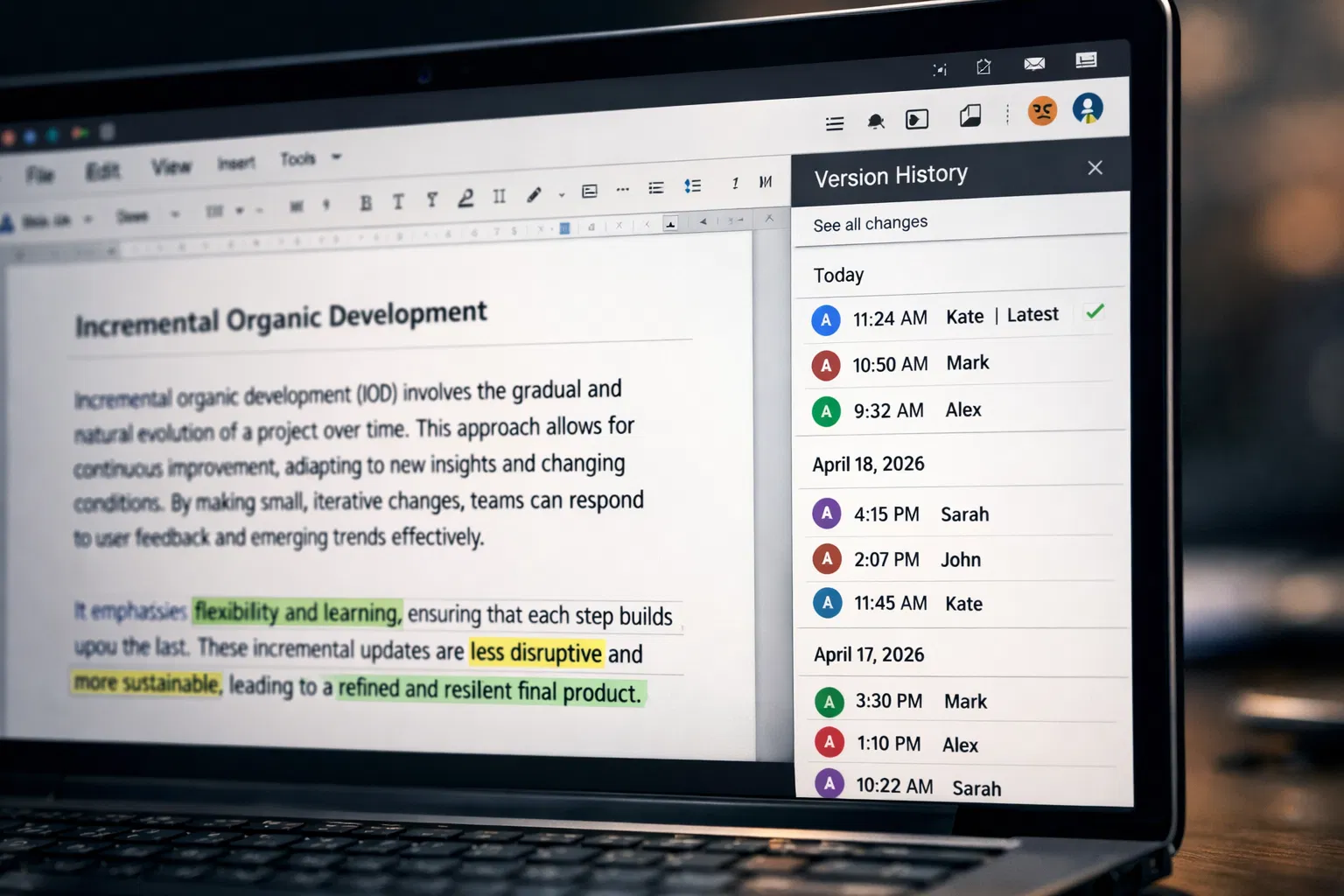
Google Docs keeps a full history of every edit. Each change shows who made it and when. No setup needed. The record starts from the first save. It stays active as long as the file exists. Some documents go back ten years or more. You can see every update, no matter how small. That's already built in. Every word added or deleted is tracked exactly.
How to Access and Read Your Version History
Any Google Doc can be opened from File>Version history to view its version history. The most recent snapshots and previous versions are displayed in the panel, each with its respective time. You just need to click a specific historical point to view the document's fine details at that time. It is also quite easy to find the Google account that has made each change if you have shared the document with colleagues.
Google Docs version history authorship from the UMBC Division of Information Technology discusses how this version history shows the distinction between actual iterative writing and pasted work from an AI tool. A student who has copied and pasted from an AI tool will have a document that went from empty to mostly complete in one session, whereas a student who has written their own work will have multiple sessions, with changes made over multiple days, edits, revisions, and so on.
Key Insight: AI-generated content pasted into Google Docs appears as a single large paste event in the version history. Human-written content appears as many small incremental changes spread across one or more sessions. The pattern itself tells the story. When you are genuinely writing, you type a sentence, revise a word, delete a clause, add a paragraph, and return the next day to rework the opening, and history shows all of that. That level of incremental organic development is exactly what an AI generation event cannot replicate. |
Save named versions of the work at various stages of development. Once you have finished your initial outline, save a named version. Once you have finished the first draft, save another. Once you have finished the major revisions, save another copy. This creates a record of development beyond the normal save history. Reduce AI detection risk by ensuring your final document's statistical profile matches what detectors expect from human writers, while the version history serves as proof when the detection flag still occurs.
Grammarly Authorship: Proactive Process Tracking
Grammarly Authorship is a completely different approach to AI transparency than statistical detection. Unlike the approach of analyzing a document and making an educated guess about its origin, Authorship observes the writing process while it happens and logs what it observes.
How Grammarly Authorship Works
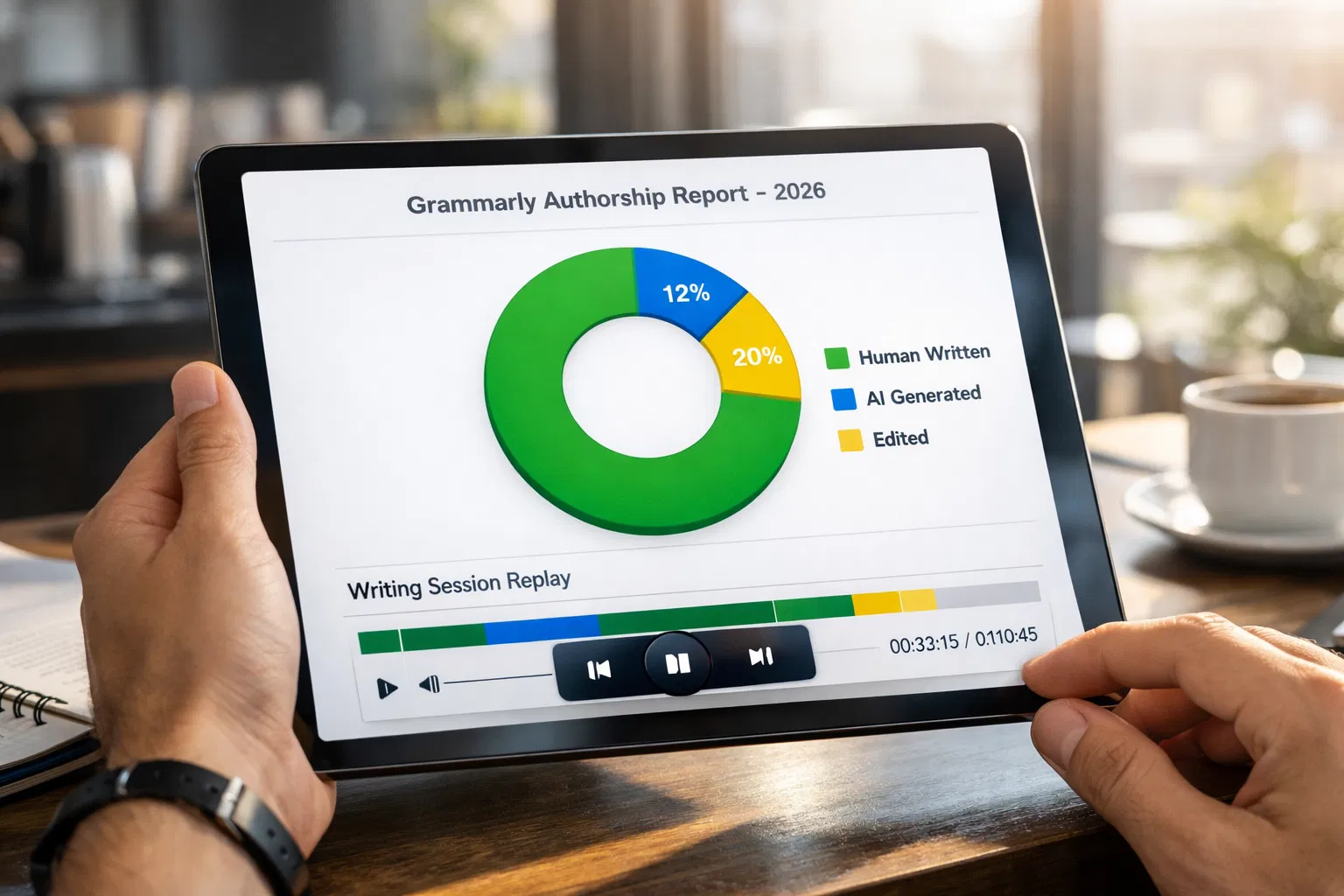
Grammarly's Authorship tool does so by running within your browser while you write your documents in Google Docs or Microsoft Word. Once you activate it, it tracks your keystrokes and clipboard activity and classifies your text into four categories: text you write, text generated by an AI tool, text copied from a browser-based source, or text edited with Grammarly's AI-based tools. At any time, you can generate a shareable authorship report that includes your sources of texts, your total time spent writing, your active sessions count, and a replay of your entire writing process from start to finish.
Grammarly Authorship update 2025, and it does so by running within your browser while you write your documents in Google Docs or Microsoft Word. Once you activate it, it tracks your keystrokes and clipboard activity and classifies your text into four categories: text you write, text generated by an AI tool, text copied from a browser-based source, or text edited with Grammarly's AI-based tools. At any time, you can generate a shareable authorship report that includes your sources of texts, your total time spent writing, your active sessions count, and a replay of your entire writing process from start to finish.
When and How to Use Grammarly Authorship
The biggest limitation of Grammarly Authorship is that it only tracks your writing while Authorship is enabled. It cannot go back and write a report on a piece of work you have already written. You have to have it enabled before you start writing any piece of work you want to protect. The steps to use Grammarly Authorship are to open a new document, enable Grammarly Authorship before you start to write anything in the document, write your document as you normally would, and then generate your Authorship report when you are finished.
You can share your report via a link that does not require the recipient to have a Grammarly account. If you are accused of plagiarism on a piece of work, you can share the link with an instructor or academic integrity officer who has doubted your work, allowing you to show him or her a color-coded visualization of your writing process and a replay of your typing history. For a professional writer, the same report can be shared with editors or publishers who have doubted your work for any reason related to authenticity.
Screen Recording and Replay Tools
For high-stakes submissions, recording your screen while you write captures the entire process. This is the route Moira Olmsted took when she learned of her false accusation case. The most convincing visual proof of authorship is a screen recording of you typing, deleting, researching, and revising over an extensive period of time.
Screen Recording for Writing Sessions
If you have high-stakes work to submit, recording the screen during the writing session can help capture the entire process. This is the method Moira Olmsted chose to use after the false accusation case. A video of you typing, deleting, and researching while writing for an extended period of time is the most compelling form of evidence of authorship. This is because it is the actual act of writing and cannot be faked without great effort.
Draftback: Replay from Existing Google Docs History
Draft a Google Docs reply. Draftback is a Chrome extension that takes your current Google Docs revision history and plays it back as a video, letting you see your document being written from the first character to the last. Unlike screen recording, Draftback does not require you to proactively set up a recording of your work; it works retroactively on any document you have already stored in Google Docs. This extension is useful if you have already written something and need to defend your process but have not been proactive about tracking your work from the beginning. Draftback will let you use your existing version history to replay every keystroke, every deletion, and every revision you have made in your document.
The replay Draftback generates is visual and compelling: it shows the document growing incrementally, with pauses where you thought, deletions where you changed your mind, and the natural back-and-forth rhythm of human writing. It cannot show activity that happened outside Google Docs, but for work done in Google Docs, it provides strong evidentiary support. Tools that beat AI detectors through statistical adjustments target the detection score; DraftBack targets the human review that follows a flag.
Research Notes, Outlines, and Rough Drafts
One of the best tests of true authorship is the level of messwork that goes into the final product. AI generation has complete, clean output right from the start. The output of human writing has abandoned paragraphs, experiments in structure that didn’t quite make it, confused scribbles about what you’re trying to say, and raw ideas that get polished over several drafts. These are signs of real intellectual growth, and they’re something the AI generation doesn’t exhibit.
Keeping Annotated Research Notes
As you research your topic, keep a document of your notes. Include the date of the reading and your thoughts on the reading. Copy a section of the reading and then write your thoughts on the section directly below it. This is the authentic you. This is the process of thinking, and the thinking is not just reflected in the final product; it is the final product.
Saving Outline Drafts
It’s also important to have an outline before you start writing and save it. Use your thinking process to create the outline. This means you will have a basic structure, sub-points, and the ability to rearrange and cross out items and to add notes about the examples you will use. You should save this as a separate document or save it under a name in your main document before you start writing. An outline with specific personal details, concrete examples you planned to use, and a clear structure that reflects your argument is strong evidence that the ideas in the final paper were generated by you.
Preserving Early Rough Drafts
It’s best to write a first draft that’s imperfect. Write through your ideas without editing them too much. This first draft should be saved separately with a different name. The reason why it’s almost impossible to fake a first draft is that it will have the natural imperfections of the genuine article. Nobody will ever pass off AI-generated writing as genuine if they have to submit the first draft as evidence. This is because AI writing will always be polished and won’t have the imperfections of a first draft. The first draft you wrote shows that the ideas went through the same development process as the finished article. Using an AI content humanizer on your polished final version does not touch your rough draft or notes, which remain as authentic process evidence.
File Metadata and Digital Timestamps
Your documents contain metadata that tracks when they were created and last modified, as well as the named author. This information is separate from the document's contents and offers a separate history of the document that cannot be altered without leaving evidence.
Microsoft Word Document Properties
The Microsoft Word document properties panel (which you can access from File/Info on Windows or the Properties menu on Mac) provides information such as the author, creation date, last modified date, and total time spent editing. The time spent editing feature is very handy because it records the total time the document was opened in editing mode. For example, a document that was edited for two hours and then submitted after a week of work makes a completely different impression than a document that has had only two minutes of editing time.
Ensure that the Author field in Word accurately reflects your real name rather than a generic placeholder or a previous owner's name. For example, the Author field on institutional computers may, by default, display a department name or a generic user profile name. In Word, access File, then Options, and then General to check that your real name is entered in the "Personalize your copy of Microsoft Office" section. This is a simple step many writers overlook, and it can make a difference when document metadata is scrutinized in an authorship dispute.
PDF Metadata and Creation History
When a document is exported as a PDF, the resulting PDF inherits certain metadata from the original document, such as the Author field, the creation application (indicating the software used), and the creation and modification timestamps. These fields are available and can be reviewed by anyone using a PDF viewer that displays metadata. The same regulations regarding the Author field also apply: it is essential to include your name in the metadata before export.
Understand that metadata can be viewed by recipients. This cuts both ways: if your metadata is accurate, it supports your authorship claim. If you ever submit a document with someone else's name in the Author field or a creation date that contradicts your claimed timeline, it creates problems. The goal of producing undetectable AI text through statistical adjustments is separate from metadata authenticity; metadata must be accurate regardless of detection adjustments.
Building a Formal Authorship Appeal Case
If you are formally accused of AI-generated writing based on a detection score, you need to build a structured appeal case rather than simply saying you wrote the work yourself. Here is how to approach that process.
Step 1: Request the Specific Evidence Against You
Before you respond to any accusation, ask for the specific evidence being used against you. What detection tool produced the score? What was the exact score? Which sections of the document were flagged? What threshold does the institution apply before initiating proceedings? These are facts you are entitled to know, and they shape your defense. A 72 percent AI probability score from a tool that flags 50 percent of legitimate human writing in independent testing is different from a 97 percent score from a tool with a documented low false-positive rate.
Step 2: Organize Your Process Documentation
Gather everything that documents your writing process in chronological order. This includes your Google Docs version history with timestamps, your Grammarly Authorship report (if you generated one), your rough drafts and outlines, your research notes with dates, your screen recordings (if you made any), and your file metadata showing creation and modification dates. Organize this into a clear timeline showing when you started, how the document developed, and when you completed it.
Step 3: Prepare to Demonstrate Understanding
The most persuasive form of authorship evidence in any appeal is the ability to explain your work in detail. Be prepared to discuss specific choices you made, why you structured the argument as you did, what you learned from the research, what you initially thought that changed as you wrote, and what you would do differently now. This kind of authentic engagement with the content of your work is something a student who submitted AI-generated output without reading it thoroughly cannot convincingly replicate. Know your work well enough to talk about it naturally, including the parts you found difficult.
Step 4: Know Your Policy Rights
Most academic integrity policies require substantive evidence of misconduct before any adverse action is taken, and most recognize that AI detection scores alone are not that evidence. Turnitin's own documentation states its scores should not be used as the sole basis for action. Many institutions have appeal committees, ombudspersons, and due process requirements. Look up your institution's specific academic integrity policy and procedures before your first meeting, and document every interaction with whoever is handling your case. Using a free AI humanizer to ensure your work passes detection before submission reduces the probability you reach this step; knowing your rights ensures you are protected when you do.
The Complete Pre-Submission Documentation Checklist
Use this checklist before submitting any important writing that may be subject to AI detection.
Evidence Type | How to Create It | Strength as Authorship Proof |
Google Docs version history | Write in Google Docs, access via File > Version history, and save named versions at key stages | Very strong: timestamps auto-recorded, shows incremental development, cannot be fabricated retroactively |
Grammarly Authorship report | Enable before writing. Generate and download a completion report; it is shareable via a link. | Strong: proactively tracks keystrokes and sources; shows session count and duration; reviewable by others |
Draftback replay | Install Chrome extension, run on any existing Google Doc, and export full keystroke replay | Strong: works on documents you already wrote; visual and compelling; shows deletions and revisions |
Screen recording | Use the OS screen capture before starting to write; record the full session | Very strong: video evidence of actual writing; nearly impossible to convincingly fake |
Research notes with timestamps | Keep annotated notes with source dates; write personal reactions to sources | Strong: personal voice and specific source engagement are hard to mimic with AI output |
Rough drafts | Save early imperfect drafts as separate files or named versions | Strong: messy human drafts are structurally different from AI output; they show development over time |
Outlines before drafting | Create and save an outline before writing, and include personal notes about intended arguments | Moderate: shows planning preceded writing; less conclusive than revision history |
File metadata (Author, dates) | Verify the Author field contains your name before saving; export PDF from your named account | Moderate: easily checked; supports timeline; should be accurate as a basic practice |
Prior writing samples | Maintain a personal portfolio of past work in your writing style | Moderate: shows stylistic consistency with your established voice; useful for style comparison |
Making AI detection bypass proactive by adjusting your text's statistical profile before submission is the first line of protection. This checklist is your second line.
Solution Section: A Practical Documentation Workflow for 2026
The goal is to make documentation a natural part of your writing workflow rather than a reactive scramble when something goes wrong. Here is a practical workflow you can adopt immediately.
Start Every Important Document in Google Docs
Even if you prefer another word processor, use Google Docs for the initial drafting and early revision of any document where authorship might be challenged. The automatic version history is stored by Google and is accessible regardless of whether you saved manually. If you prefer to finish in Word, draft in Google Docs, and then migrate your final version. The Google Docs revision history of your drafting process remains available.
Enable Grammarly Authorship Before You Type the First Word
Install the Grammarly browser extension, create a free account if you do not have one, and get into the habit of clicking the thumbprint icon to enable Authorship whenever you open a new, important document. It takes two seconds. You can set it to start automatically for all new documents. The habit of enabling it before writing means you will always have the option of generating an authorship report if the document later faces scrutiny.
Keep a Research Log Dated to Your Sessions
For longer pieces, maintain a running research log in a separate Google Doc. When you read a source, note the date, the source, and your reaction in two to three sentences in your own voice. When an idea occurs to you, add it to the log with the date. This creates a timestamped intellectual history of how your thinking developed before and during the writing process. It is the kind of document that only genuine research produces, and it is one of the strongest pieces of secondary evidence you can show in an authorship dispute.
Run Your Final Document Through a Statistical Detector Before Submitting
Before submitting any important document, run it through at least one AI detection tool to see how it scores. If it scores highly for AI, review which sections are flagged and consider whether a statistical adjustment from a Humanize AI writing tool would reduce the risk of a false positive. You have completed the documentation to prove your authorship; there is no reason to accept the unnecessary risk of triggering a detection flag when a quick adjustment can prevent it without affecting the scientific accuracy or core content of your work.
Conclusion
Proving you wrote something yourself in 2026 is a practical skill that requires both proactive documentation and reactive preparation. The tools available are genuinely useful: Google Docs version history automatically stores your process, Grammarly Authorship tracks your keystrokes in real time, Draftback turns that history into a visual replay, and screen recording captures the act of writing itself. Research notes, rough drafts, file metadata, and prior writing samples all add depth to an authorship case that a detection score alone cannot rebut. The most vulnerable position is the one most writers are currently in: submitting finished work with no process record, hoping the detector gives them a low score. The alternative takes fifteen minutes of setup and a modest habit change, and it means you are ready for the world where every piece of writing you produce could eventually need to be explained. Writers who need to humanize neurodivergent writing or any genuine human content to pass statistical detection have the same need for process documentation as any other writer. The detection score and the documentation are independent protections. You need both.
Frequently Asked Questions
How do I prove I wrote something myself if an AI detector flags it?
The strongest evidence is process documentation showing how the document was developed over time. Google Docs' version history with timestamps is your most powerful tool because it automatically records every change and shows whether your document was built incrementally across multiple sessions or appeared as a single paste event. Grammarly authorship reports, screen recordings, research notes with dates, rough drafts, and file metadata all contribute to a complete picture of authorship. Combine this documentation with the ability to discuss your work in detail, explaining specific choices and the thinking behind them. An AI detection score is a probabilistic output; your process documentation is direct evidence of how the work was actually created.
How does Google Docs version history help prove authorship?
Google Docs stores a complete timestamped record of every change made to every document, automatically and without any action on your part. Accessing it through File > Version history > See version history shows you the document at every point in its development. For authorship purposes, this history reveals whether a document was built through incremental human writing (many small changes spread across multiple sessions) or pasted as a complete block (a single large change event). A genuinely human-written document that took two weeks to write will have a revision history showing research notes, rough sentences, deleted drafts, and structural rearrangements across many sessions. That pattern is essentially impossible to fake after the fact.
What is Grammarly Authorship, and can it prove I wrote my own work?
Grammarly Authorship is a writing process tracking feature available on free Grammarly accounts in Google Docs and Microsoft Word. When you activate it before you start writing, it monitors your keystrokes and clipboard activity, categorizing text as typed by you, generated by AI, or pasted from external sources. At completion, it generates a shareable report showing your writing time, session count, and a full replay of the writing process. This report is designed as a transparency and verification tool: you can share it directly with an instructor or reviewer via a link that does not require them to have a Grammarly account. As a proactive authorship documentation tool, it is one of the strongest single tools available because it records the writing process prospectively rather than inferring it after the fact.
What evidence should I gather before submitting important writing?
Before submitting anything where AI detection might be applied, ensure you have at a minimum your Google Docs version history accessible, a Grammarly Authorship report if you enabled tracking from the start, your research notes with timestamps, at least one rough draft showing early-stage thinking, and file metadata containing your actual name and accurate creation dates. For very high-stakes submissions such as grant proposals, thesis chapters, or professional work, add a screen recording of at least one major writing session. Store all of this in a folder associated with the document so it is immediately available if you need it. Using an AI text transformer before final submission adds a proactive layer of statistical protection that complements this documentation.
How do I appeal an AI detection false positive at my institution?
Start by requesting the specific evidence used against you: the detection tool, the exact score, and which sections were flagged. Then organize your process documentation into a clear timeline showing when you started writing, how the document developed, and when you completed it. Prepare to explain your work in detail, including specific choices, sources used, and the reasoning behind your argument structure. Review your institution's academic integrity policy to understand what evidence standard applies and what due process is available. Most policies require more than a detection score to support an adverse finding, and many explicitly recognize that detection scores are probabilistic rather than determinative. Present your documentation as the positive case for your authorship rather than simply disputing the score. You are not proving the detector is wrong; you are demonstrating independently that you wrote the work.